 IK Astro
Zeros = emptyFour corners
01
Find the edge
It detects the valid data (tools like APP fill empty areas with zeros), traces the boundary and picks the four corners.
MultiPointCrop is a PixInsight module that turns the ragged edges of a mosaic into a clean rectangle by deforming the image instead of cutting it away. You keep the field you spent the nights collecting.
Instead of picking the biggest rectangle inside your data, MultiPointCrop stretches a deformation mesh so the edge of the data lands exactly on the edge of the frame.
It detects the valid data (tools like APP fill empty areas with zeros), traces the boundary and picks the four corners.
A Coons patch gives a first guess, then a solver makes every mesh triangle as close to a pure rotation and scale as it can. Border points slide along the edge, so stars stay round.
Resampling limits ringing so there are no dark halos around stars. The result opens in a new window, <id>_mpc. Your original is never changed.
Three ways to work, all with a live preview of the result. You can find it under Process › Geometry › MultiPointCrop.
Boundary and corners are detected when you execute. The fastest route for regular mosaics.
Detect boundary turns the detected edge into points you can adjust by hand before running.
Click the outline yourself. Exactly four points are corners. Hard mosaics, such as wide Milky Way fields, are what Manual and Combined are for.
Numbers from the module's engine tests on a synthetic 2×2 mosaic (2600×1800, RGB float). After every run a quality report goes to the console.
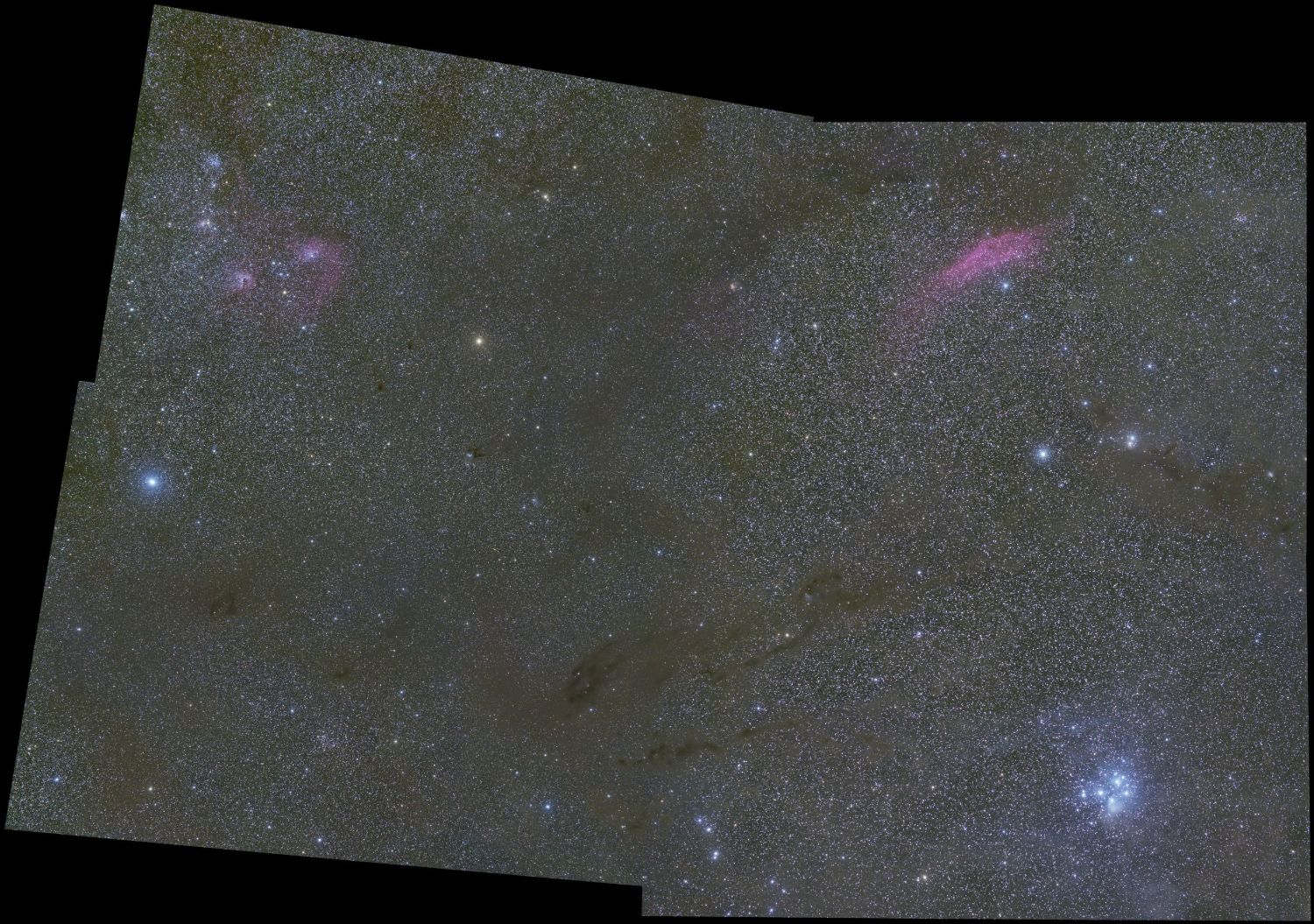
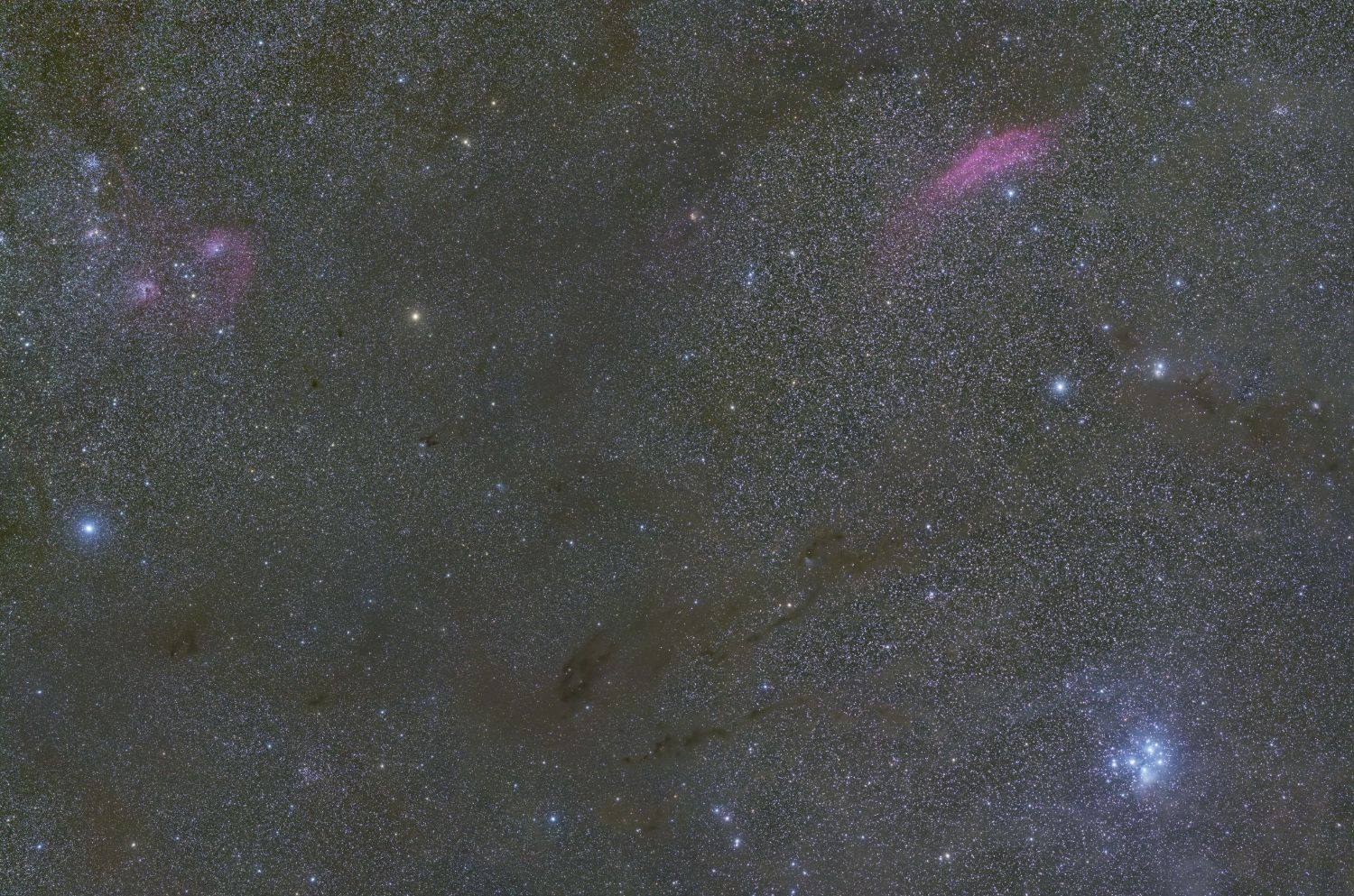
The real result: California Nebula and the Pleiades region, two stitched panels. Drag to compare the raw mosaic with the MultiPointCrop output.
Solving takes about 1.4 s and the quarter-scale preview under 3 ms on this test. The numbers come from a synthetic 2×2 mosaic test; the image at the top is real data.
A native module, so no scripts and no extra dependencies.
After purchase you receive your licence key. The module itself is distributed through our PixInsight update repository, so there is nothing to download by hand.
In PixInsight open Resources › Updates › Manage Repositories, add https://updates.ikastro.com/pixinsight/modules/, then run Resources › Updates › Check for Updates and install MultiPointCrop. Updates arrive the same way.
Find it under Process › Geometry › MultiPointCrop, then click an image to make it the target. The preview appears on the right.
Enter the key in the Preferences tab. Without a licence the preview and point editing work, but Execute is locked.
No. The result always opens in a new window named <id>_mpc, and the original is left as it was.
The live preview and point editing work without a licence. Execute and Apply need an activated licence. You can also start a 14-day free trial with a free account: it unlocks everything on one computer, once per person.
The solver asks every triangle of the mesh to be as close as possible to a rotation plus uniform scale, so local shapes are preserved. The quality report shows the stretch it measured, so distortion is reported instead of hidden.
Very irregular mosaics, such as wide Milky Way fields, can wrinkle in Automatic mode. Use Combined or Manual and place the points yourself. Deep gaps between panels are detected in the metrics, not covered up.
Yes, you can choose a square shape. Warping a non-square mosaic into a square stretches stars (about 1.4× at a 1.4:1 ratio). A “Square (crop)” variant that trims the long side first is planned.
Only to activate and to re-check the licence every 7 days. After a successful check it keeps working offline for 30 days. The module talks only to the licence server.
Two. Deactivate this computer in the Preferences tab frees a slot you can use on another machine.
Preview it for free, buy a licence when you want to export.
Personal licenceNo card needed for the trial. Secure card payment by Stripe when you buy. You need a free account for both. Questions? [email protected]